


Summary
- WhatsApp Business helps companies engage prospects and customers through a fast, personal, and highly effective communication channel.
- Whether you use WhatsApp Business App or WhatsApp Business API, there’s a solution adapted to your business size and automation needs.
- By integrating WhatsApp with noCRM, sales teams can turn conversations into opportunities, track interactions, and manage leads more efficiently.
Sales and customer engagement move faster than ever, and businesses that want to stay ahead need to meet their customers where they already are. WhatsApp has evolved from a simple messaging app into a powerful business tool, helping companies connect with prospects, close deals more efficiently, and provide seamless support.
With over 2 billion active users worldwide, WhatsApp presents an unmatched opportunity for businesses to engage their audience in real time. Its effectiveness is clear: WhatsApp messages have an open rate of over 90%, far surpassing traditional email communication.

That means businesses can be confident that their messages are seen and read almost instantly. Whether used for customer service, lead nurturing, or direct sales, WhatsApp has become a go-to channel for businesses looking to add a personal touch to their interactions.
In this guide, we’ll break down how businesses can leverage WhatsApp for sales, the benefits of integrating it into their strategy, and how noCRM can help streamline lead management within WhatsApp.
What is WhatsApp Business?
Before diving into its benefits, it’s important to understand the different versions of WhatsApp Business and how they serve different business needs.
WhatsApp Business Overview
WhatsApp Business is an extension of the standard WhatsApp Messenger, built to help companies manage customer interactions more effectively. It offers essential business features such as profile customization, automated responses, and structured messaging.
There are two primary versions:
- WhatsApp Business App – Designed for small businesses, this free version provides essential tools like automated replies, quick responses, and product catalogs. It enables businesses to engage with customers easily without requiring advanced integrations.
- WhatsApp Business API – Built for medium and large enterprises that need automation, CRM integration, and large-scale messaging capabilities. It allows businesses to handle high volumes of customer interactions efficiently while ensuring compliance with WhatsApp’s guidelines.
Want to use WhatsApp Messenger or Business for your prospecting? noCRM’s WhatsApp Chrome Extension seamlessly integrates with any version you’re using, ensuring smooth and efficient communication. Learn more here.
Key Features of WhatsApp Business
WhatsApp Business is packed with features designed to enhance customer engagement and streamline sales processes. Whether you're looking to improve response times, showcase products, or automate conversations, these tools make business communication more efficient and effective.
Business Profile & Product Catalog
A Business Profile allows companies to present essential details—business name, location, contact information, and website links—all in one place. This ensures customers can quickly find key information without needing to search elsewhere.
The Product Catalog takes things a step further by allowing businesses to display their offerings directly within the app. Instead of directing customers to an external website, businesses can showcase products and services in an easy-to-browse format, making inquiries and purchases more seamless.
Automated Messaging & Customer Segmentation
Speed is everything in sales and customer service, and Automated Messaging ensures businesses never miss an opportunity to engage with their audience. Companies can set up:
- Greeting messages to welcome new customers
- Away messages to inform customers when a business is unavailable
- Quick replies to instantly respond to frequently asked questions
Beyond automation, Customer Segmentation makes it easier to track and manage interactions. With labels, businesses can categorize conversations based on where customers are in the sales funnel—whether they’re new leads, repeat buyers, or high-priority prospects. This makes follow-ups more strategic and targeted.
Bulk Messaging & Interactive Features
When communicating at scale, businesses can use Broadcast Lists to send messages to multiple customers at once—without creating a group chat. This keeps interactions private and professional while still reaching a broad audience.
For businesses that want to elevate customer engagement, WhatsApp also supports:
- Rich media messages with images, videos, and documents
- Interactive buttons that make it easier for customers to respond or take action
- Payment integration in selected regions, allowing seamless transactions directly within WhatsApp
WhatsApp Business API: Scaling Sales and Customer Communication
For businesses looking to expand their reach and streamline communication, the WhatsApp Business API provides a more advanced solution with enhanced automation and integration capabilities.
Advanced Capabilities
The WhatsApp Business API transforms business communication by enabling automation and optimization at scale. Unlike the free WhatsApp Business App, the API is a paid service that integrates directly with customer relationship management (CRM) systems, chatbots, and automation tools.
Benefits of the API
The biggest advantage of the API is its ability to support high-volume messaging, making it ideal for businesses that need to engage with large numbers of customers efficiently. Automation is a key factor, allowing businesses to create workflows for follow-ups, trigger responses based on customer actions, and integrate AI chatbots for 24/7 support.
Compliance and Pricing Considerations
Using the API requires businesses to comply with WhatsApp’s policies, including obtaining explicit customer consent before sending messages and following guidelines on promotional content. Pricing is based on a per-conversation model, with different rates depending on whether the message is initiated by the customer or the business.
By integrating WhatsApp with a CRM, businesses can further optimize lead management and ensure seamless communication throughout the sales process. In the next section, we’ll explore how to make the most of WhatsApp within a structured sales strategy.
How to Set Up a WhatsApp Business Account
Before businesses can start leveraging WhatsApp for sales and customer engagement, they need to set up a WhatsApp Business account. The process is quick and straightforward, ensuring a smooth transition into using WhatsApp as a professional communication tool.
Step 1: Download the WhatsApp Business App
- Available on both iOS and Android, the WhatsApp Business app is separate from the standard WhatsApp Messenger.
- Download and install it from the App Store or Google Play Store.
Step 2: Register Your Business Number
- Open the app and enter your business phone number (it must not be linked to an existing personal WhatsApp account).
- Verify the number via SMS or phone call.
Step 3: Set Up Your Business Profile
- Go to Settings > Business Profile and fill in essential business details, including:
- Business Name
- Business Category
- Description
- Location & Contact Details
- Website & Social Media Links
Step 4: Customize Messaging Features
To enhance customer interactions, set up:
- Greeting Messages – Welcome new customers automatically.
- Away Messages – Inform customers when you’re unavailable.
- Quick Replies – Save time by setting up shortcuts for common responses.
Step 5: Add a Product Catalog (Optional, but Recommended)
- Showcase products or services directly in WhatsApp.
- Add product descriptions, images, and pricing to help customers browse with ease.
Step 6: Enable Click-to-Chat & QR Codes for Easy Access
- Generate a Click-to-Chat link to allow customers to start a conversation without saving your number.
- Create a QR Code that customers can scan to connect instantly.
Step 7: Integrate with a CRM for Maximum Efficiency
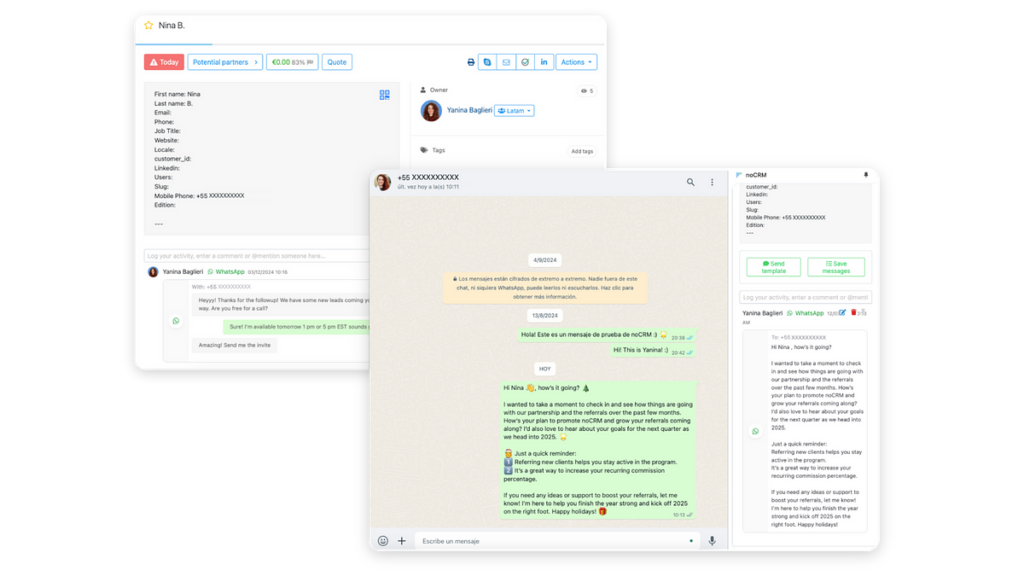
While WhatsApp Business is powerful on its own, integrating it with a CRM like noCRM takes it to another level. By syncing conversations with your sales pipeline, you ensure structured lead management and follow-ups.
Discover noCRM’s WhatsApp Chrome Extension now.
Benefits of Using WhatsApp for Business
Integrating WhatsApp into your business strategy isn’t just about convenience—it’s a powerful tool for increasing engagement, building trust, and improving efficiency.
High Engagement & Faster Communication
Unlike emails that often go unread, WhatsApp messages are opened and responded to almost immediately. This makes it an ideal platform for time-sensitive conversations, lead nurturing, and customer support. Faster communication means higher conversion rates and improved customer satisfaction.
Automation & Efficiency
With WhatsApp, businesses can handle large volumes of inquiries without compromising response times. Automation features allow teams to focus on high-value tasks instead of repetitive manual messaging. Whether it’s an FAQ bot or an automated follow-up system, WhatsApp helps businesses operate smarter, not harder.
Security & Trust
Trust is everything in business, and WhatsApp Business API users receive a verified business badge, signaling legitimacy to customers. Plus, with end-to-end encryption, businesses can ensure that customer data remains private and secure—strengthening their reputation as a reliable and professional brand.
Cost-Effectiveness
Compared to traditional SMS or phone calls, WhatsApp is a more affordable way to communicate, especially for businesses with international clients. Since it operates over an internet connection, it reduces messaging and calling costs while maintaining a high-quality communication experience.
Multi-Device Support
WhatsApp Business allows seamless communication across multiple devices, making it easy for teams to collaborate without relying on a single phone. This ensures that customer inquiries can be handled efficiently, no matter who on the team is available.
Recap: Choosing the Right WhatsApp Solution for Your Business
To help you select the best option for your needs, let's compare WhatsApp Messenger, WhatsApp Business, and WhatsApp Business API.
Best Practices for Using WhatsApp in Sales & Customer Communication
To get the most out of WhatsApp for Business, companies need to follow best practices that drive engagement while maintaining compliance.
Be Responsive
Speed matters. Customers expect quick replies, and slow responses can result in missed opportunities. Timely engagement builds trust and keeps conversations moving forward.
Personalize Your Communication
A one-size-fits-all approach doesn’t work in sales. Addressing customers by name and referencing past interactions creates a more meaningful and personalized experience, increasing the likelihood of conversion.
Use Click-to-Chat Links for Instant Conversations
Click-to-chat links eliminate friction by allowing customers to start a conversation without saving a phone number. Businesses can place these links on websites, emails, and social media to make it easier for prospects to reach out.
Leverage QR Codes for Seamless Access
QR codes take accessibility to the next level. Placing them on packaging, storefronts, and marketing materials lets customers scan and connect instantly, simplifying the engagement process.
Avoid Spamming Customers
Sending too many messages—especially without consent—can frustrate customers and even lead to WhatsApp account restrictions. Businesses should focus on delivering relevant, value-driven messages rather than overwhelming recipients with excessive communication.
Track and Analyze Performance
To continuously improve WhatsApp engagement, businesses should track key metrics like response rates and customer interactions. Analyzing this data helps refine messaging strategies and ensures communication remains effective.
Stay Compliant with WhatsApp Policies
Regulations evolve, and staying updated on WhatsApp’s policies is crucial. Compliance ensures uninterrupted business operations and helps maintain a positive brand reputation.
How to Integrate WhatsApp with a Sales CRM (noCRM)
While WhatsApp is an exceptional communication tool, manually managing leads within the app can quickly become overwhelming. This is where CRM integration makes all the difference.
noCRM provides a seamless solution, allowing businesses to manage leads directly from WhatsApp Web, whether you’re using WhatsApp Messenger or WhatsApp Business. With the noCRM WhatsApp Chrome Extension, sales teams can instantly convert WhatsApp conversations into leads without the hassle of manual data entry.
Key Features of WhatsApp & noCRM Integration
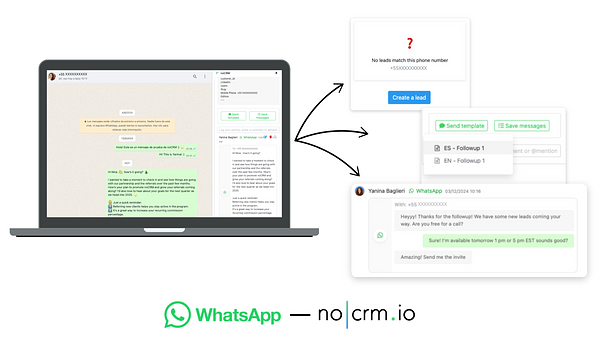
- Instant Lead Creation – Convert WhatsApp conversations into leads with a single click.
- Conversation Logging – Keep track of every interaction within noCRM for a complete history.
- Lead Management Inside WhatsApp Web – Edit lead details, set reminders, and plan next steps—all without switching tabs.
The Power of Pre-Set Message Templates
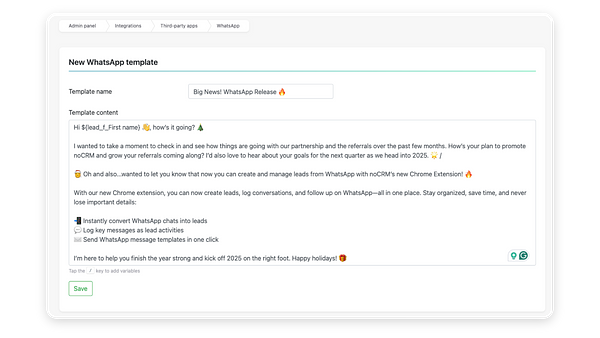
Consistency is key in sales messaging. The noCRM integration allows businesses to use pre-set message templates, ensuring communication remains professional and efficient while saving time on repetitive responses.
By integrating WhatsApp with noCRM, businesses streamline lead tracking, enhance efficiency, and never lose a valuable conversation.
Conclusion
WhatsApp Business is redefining sales and customer engagement, offering businesses an unrivaled way to connect with prospects and customers. Its high engagement rates, automation features, and real-time communication capabilities make it an indispensable tool for modern sales teams.
However, the real game-changer is integrating WhatsApp with a powerful tool like noCRM. This combination eliminates manual data entry, improves sales efficiency, and ensures every customer interaction is logged and leveraged for better conversions.
If you’re serious about taking your WhatsApp sales strategy to the next level, try the noCRM Chrome Extension today.
Manage your leads directly from WhatsApp