


Sales Tools & Automation

Easily Create Stunning Professional Quotes, Invoices, and Now Deposit & Credit Notes from your CRM

Titiana - November 20, 2024

Summary

  • noCRM combines lead management and invoicing in a single platform, allowing sales teams to create professional quotes and invoices without switching tools.
  • New features such as deposit invoices and credit notes make it easier to manage advance payments, adjustments, and more complex billing scenarios.
  • Built-in templates, automatic customer data filling, and seamless quote-to-invoice conversion help save time and reduce administrative work.

For sales professionals and managers, managing invoices should be quick and straightforward—not a complex task involving multiple tools. That’s why noCRM has enhanced its platform, allowing you to effortlessly generate beautiful, customized quotes and invoices all in one place. With new features like deposit invoices and credit notes, noCRM empowers you to manage all invoicing needs from one platform, freeing you from the hassles of traditional CRM systems.

A CRM with Invoicing for Simple Sales Management

noCRM has always prioritized simplicity and efficiency, focusing on lead management over data-heavy CRM systems. The invoicing feature initially enabled users to easily create, customize, and manage quotes and invoices directly within noCRM, making the process smoother and fully integrated with your CRM. Setting up invoicing is easy: just add your company logo, address, VAT number, and other essential details, so every document looks professional and branded.
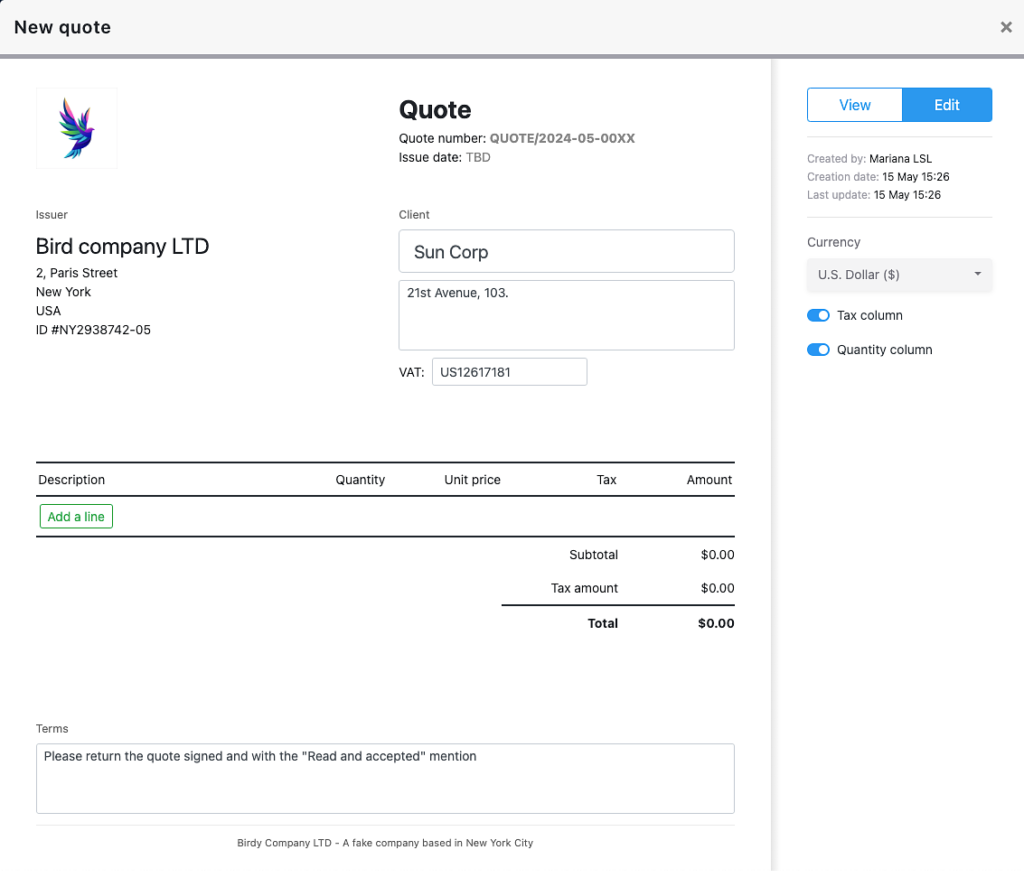
quote in nocrm

From there, sales reps can generate quotes or invoices straight from a lead’s card, with all relevant customer data automatically filled in. Quotes can be converted into invoices with just a few clicks, and document statuses like “pending,” “paid,” or “unpaid” keep everyone informed. With quotes and invoices attached to lead cards and accessible in a dedicated section, noCRM made the CRM with invoicing feature intuitive and time-saving.

New Invoicing Options: Deposit Invoices and Credit Notes

noCRM now expands its CRM with invoicing capabilities to include deposit invoices and credit notes—essential tools for handling more complex invoicing needs.

Deposit Invoices

deposit invoice in nocrm

Deposit invoices are crucial for requesting partial upfront payments, ensuring commitment from clients and reducing the risk of non-payment. Sales reps can create a deposit invoice as easily as a regular invoice, selecting “Deposit Invoice” from a quote, and entering the necessary details. This feature supports multiple deposits, providing flexibility for sales that require staged payments.

Credit Notes

With credit notes, correcting invoices becomes hassle-free. Whether adjusting for returns, discounts, or other corrections, credit notes ensure accurate customer balances without manual recalculations. Both deposit invoices and credit notes integrate automatically into the final invoice, saving sales teams time and reducing the chance of errors.

credit note in nocrm

With these additions, noCRM strengthens its role as a CRM with invoicing, allowing sales teams to handle all invoicing needs—no external tools required.

Why Choose a CRM with Invoicing Instead of a Separate Tool?

Using noCRM as your CRM with invoicing helps sales teams avoid the inefficiency of toggling between tools. Typically, sales teams manage leads in one tool and invoices in another, constantly copying and pasting data. noCRM eliminates this duplication, saving time and letting reps focus on higher-value tasks, like closing deals. With customer data, invoicing, and sales tracking in one place, noCRM’s integrated solution is designed to keep sales teams productive and organized.

New Templates for Professional Invoicing

noCRM has also added new design templates for quotes and invoices, giving your documents a polished, professional look. Users can still personalize documents with their logo and brand colors, but these new templates add visual appeal and professionalism to each CRM with invoicing document.
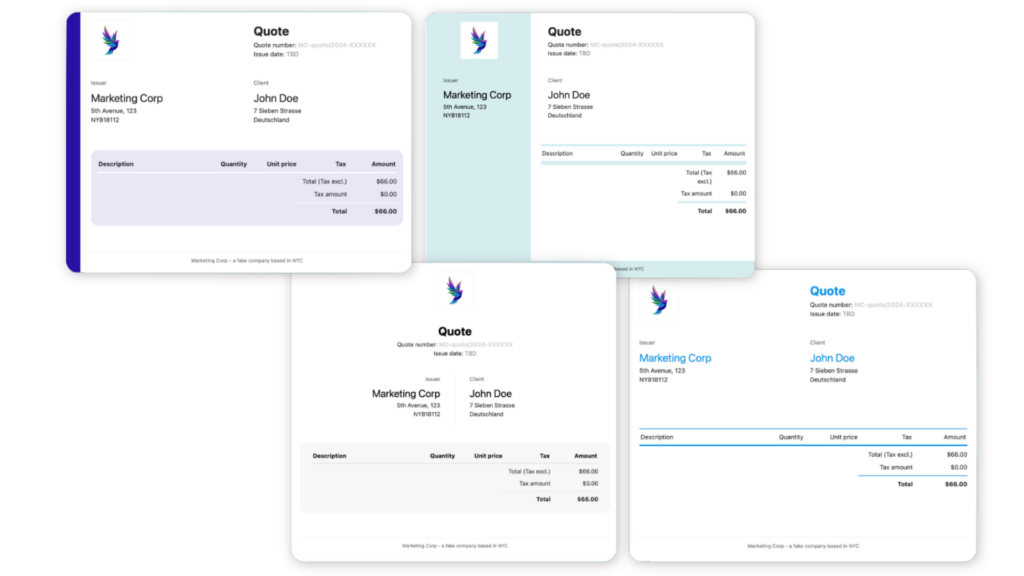
invoice templates on nocrm

Quick How-To: Creating Quotes, Invoices, and Credit Notes in noCRM

Creating documents in noCRM is simple:

1. Open the lead and select “Quote/Invoice.”

quote and invoice in nocrm

2. Choose the document type, quote in our case, but you can also directly create an invoice.

3. Enter details like product description, quantity, and price. Frequently used items will auto-fill for faster entry.

4. Set the document status (draft, accepted, pending) and download the PDF to send it, or send it directly through noCRM.

sending a quote or invoice through nocrm

5. Once the quote is accepted, you can create several deposit invoices, credit notes, and the final invoice which will include all previous deposit invoices and credit notes.

final invoice on nocrm

For further details, visit our Help Center page for a full guide on using the invoicing feature.

Conclusion

As a CRM with invoicing, noCRM is built with sales teams in mind, offering a streamlined, integrated solution for managing all aspects of sales invoicing, from deposit invoices to credit notes. noCRM eliminates the need for separate invoicing tools, freeing your team from repetitive data entry and providing a smooth, organized workflow. Get the invoicing power you need, right within the CRM made for sales.

FAQ

Q: What is the invoicing feature in noCRM, and how does it help sales teams?
A:
noCRM offers a CRM with invoicing, letting sales teams create, manage, and send quotes and invoices directly from their sales platform—no switching tools required.

Q: Can I create deposit invoices and credit notes in noCRM?
A:
Yes, noCRM now includes deposit invoices for upfront payments and credit notes for corrections, making it easy to handle more complex invoicing needs.

Q: Why use noCRM’s invoicing instead of a separate tool?
A:
noCRM’s integrated CRM with invoicing saves time and reduces errors by keeping all sales and invoicing data in one place, eliminating repetitive data entry.

Create quotes and invoices directly from your CRM

Generate professional quotes, invoices, deposit invoices, and credit notes without leaving noCRM, and keep your sales process running smoothly.

All your tools, working as one

Sales Tools & Automation
Titiana
March 24, 2026

How to boost your telemarketing campaigns

Want to accelerate your sales and uncover new opportunities? Telemarketing is your best ally. But let’s be honest, no one wants to deal with complicated tools and endless forms.

Sales Tools & Automation
Titiana
March 17, 2026

Best Lead Management Tools for Telesales

Discover essential lead management tools for telesales success. Boost your efficiency and close more deals.

Sales Tools & Automation
Titiana
February 17, 2026

noCRM vs Salesforce: Which CRM Platform is Right for Your Sales Team?

Compare nocrm and Salesforce in 2026 to find the right CRM solution for your business needs. Explore features, pricing, and suitability.

Sales Tools & Automation
Titiana
March 3, 2026

Slack Integrated Sales Tools: Complete Guide to Streamlining Your Sales Process

Discover how Slack integrated sales tools can enhance your team's performance and streamline communication.

Sales Tools & Automation
Titiana
February 24, 2026

noCRM vs HubSpot: Which Sales Tool Actually Fits the Way You Work?

Compare noCRM and HubSpot CRM to find the best fit for your business needs. Explore features, pros, and cons, and make an informed decision.

Sales Tools & Automation
Titiana
March 10, 2026

noCRM vs Monday CRM: Which Sales Platform is Right for Your Business?

Compare noCRM and Monday CRM to find the best fit for your business needs. Explore features, pros, and cons to make an informed decision.

Sales Tools & Automation
Titiana
February 10, 2026

noCRM vs Freshsales: Which CRM is Right for Your Sales Team?

Compare noCRM and Freshsales to find the best fit for your business needs. Explore features, pros, and cons to make an informed decision.

Sales Tools & Automation
Titiana
February 3, 2026

noCRM vs Zoho CRM: Which CRM Solution is Right for Your Sales Team?

Compare noCRM and Zoho CRM to find the best fit for your business. Evaluate features, pricing, and usability to make an informed decision.

Sales Tools & Automation
Titiana
January 27, 2026

noCRM vs Pipedrive: Which CRM Approach is Right for Your Sales Team?

Compare noCRM and Pipedrive to find the best CRM solution for your business. Discover key features, pros & cons to make an informed choice.

Sales Tools & Automation
Titiana
October 15, 2025

CRM for Telemarketing: How noCRM Accelerates Your Calling Campaigns

Traditional CRMs slow down telemarketing. Discover the alternative: noCRM, integrated VoIP, call scripts, prospecting lists, and much more.

Sales Tools & Automation
Grégoire
June 24, 2025

CRM Excel: Should You Switch to Lead Management Software?

Is Excel specialized enough to manage your leads? We look at why lead management software is a perfect replacement for CRM Excel.

Prospecting
Sales Tools & Automation
Titiana
June 24, 2025

Ultimate Guide to WhatsApp for Business & Sales

Discover how WhatsApp Business boosts sales, automates communication, and integrates with CRMs like noCRM for seamless lead management and customer engagement.

Sales Tools & Automation
Titiana
June 24, 2025

CRM vs Lead Management Software: Which One Should I Choose?

CRM vs lead management software isn't quite Batman v Superman levels, but it's close. Which one should you choose to support your sales team?

Sales Tools & Automation
Prospecting
Titiana
June 10, 2025

Top 10 Cloud VoIP Solutions

Looking for the best cloud VoIP solutions to enhance your business communication? We unravel key features, pros and cons, and pricing details of our top 10 tools.

Sales Tools & Automation
Titiana
March 25, 2025

Effortless Sales for Solopreneurs: Manage Leads, Send Quotes, and Close Deals with Ease

Discover how noCRM helps solopreneurs manage leads, send quotes, and close deals effortlessly—without the complexity of traditional CRMs.

Sales Tools & Automation
Titiana
January 7, 2025

Building Relationships with Leads Through WhatsApp: Tips for Salespeople

Tips for salespeople on using WhatsApp effectively to build relationships with leads.

Sales Tools & Automation
Titiana
November 20, 2024

Easily Create Stunning Professional Quotes, Invoices, and Now Deposit & Credit Notes from your CRM

Simplify invoicing with noCRM’s CRM with invoicing feature. Manage quotes, sales invoices, deposits, and credit notes seamlessly, all from one platform.

Sales Tools & Automation
Titiana
December 17, 2024

How to Manage Sales Leads Directly from WhatsApp: Introducing noCRM’s New WhatsApp Chrome Extension

Boost sales with noCRM’s WhatsApp Chrome extension. Easily create leads, log chats, and manage follow-ups without switching tools.

Prospecting
Sales Tools & Automation
Titiana
November 5, 2024

How to Be a Good Telemarketer: 9 Effective Tips

Discover 9 key tips to enhance your telemarketing skills, boost sales, and build lasting customer relationships.

Sales Tools & Automation
Prospecting
Titiana
November 12, 2024

How to Draft Efficient Meeting Request Emails: A Comprehensive Guide

Learn how to draft effective meeting request emails that engage recipients and secure appointments with our comprehensive guide and practical tips.

Sales Tools & Automation
Titiana
July 25, 2023

Follow-up effectively on WhatsApp with pre-filled messages

Discover how to leverage WhatsApp's for sales with pre-filled message templates to streamline your sales process and boost customer satisfaction.

Sales Tools & Automation
Sunny
January 11, 2018

Lead Management System vs CRM: What's the Difference?

Lead Management System vs CRM: what's the difference? We're here to show you how they differ and why you probably don't need a CRM

Built for people who actually sell

noCRM is the action-driven sales tool built to cut admin and close more deals.

No credit card required
Set up your pipeline in minutes
Start managing leads instantly